Showing posts with label Constant's Variables And Data Types. Show all posts

Tuesday, 3 July 2012

Java Environment


Java Environment :
Java emironment includes a large number of development tools and hundreds of classes and methods. The development tools are part of the system known as Java Development Kit (JDK) and the classes and methods are part of the Java Standard Library (JSL), also known as the Application Programming Interface (API).

Java Development 

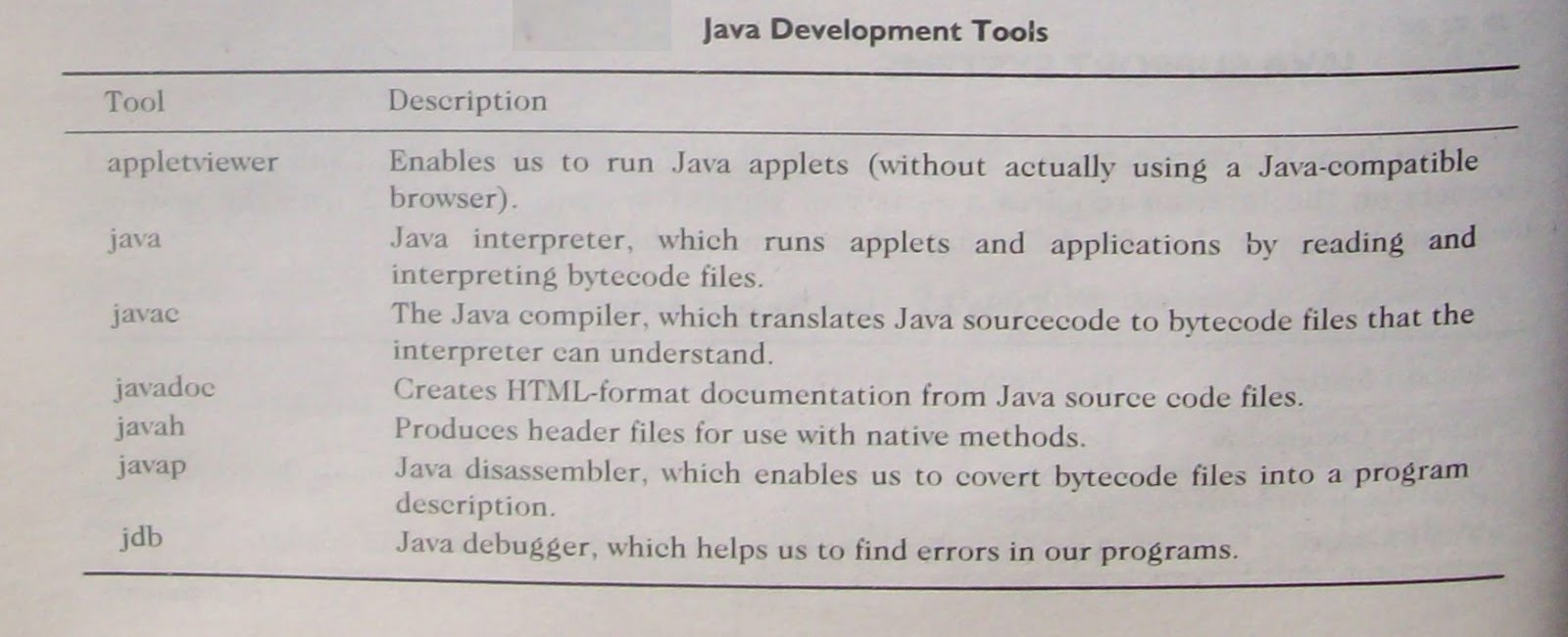
The Java Development hit comes with a collection of tools that are used for developing and running Java programs. They include:
• appletviewer ( for viewing Java applets )
• avac ( Java compiler )
• java ( Java interpreter )
• javap ( .lava disassembler )
• javah ( for C header files )
javadoc ( for creating HTNIL documents )
• jdb ( Java debugger )
Table lists these tools and their descriptions.

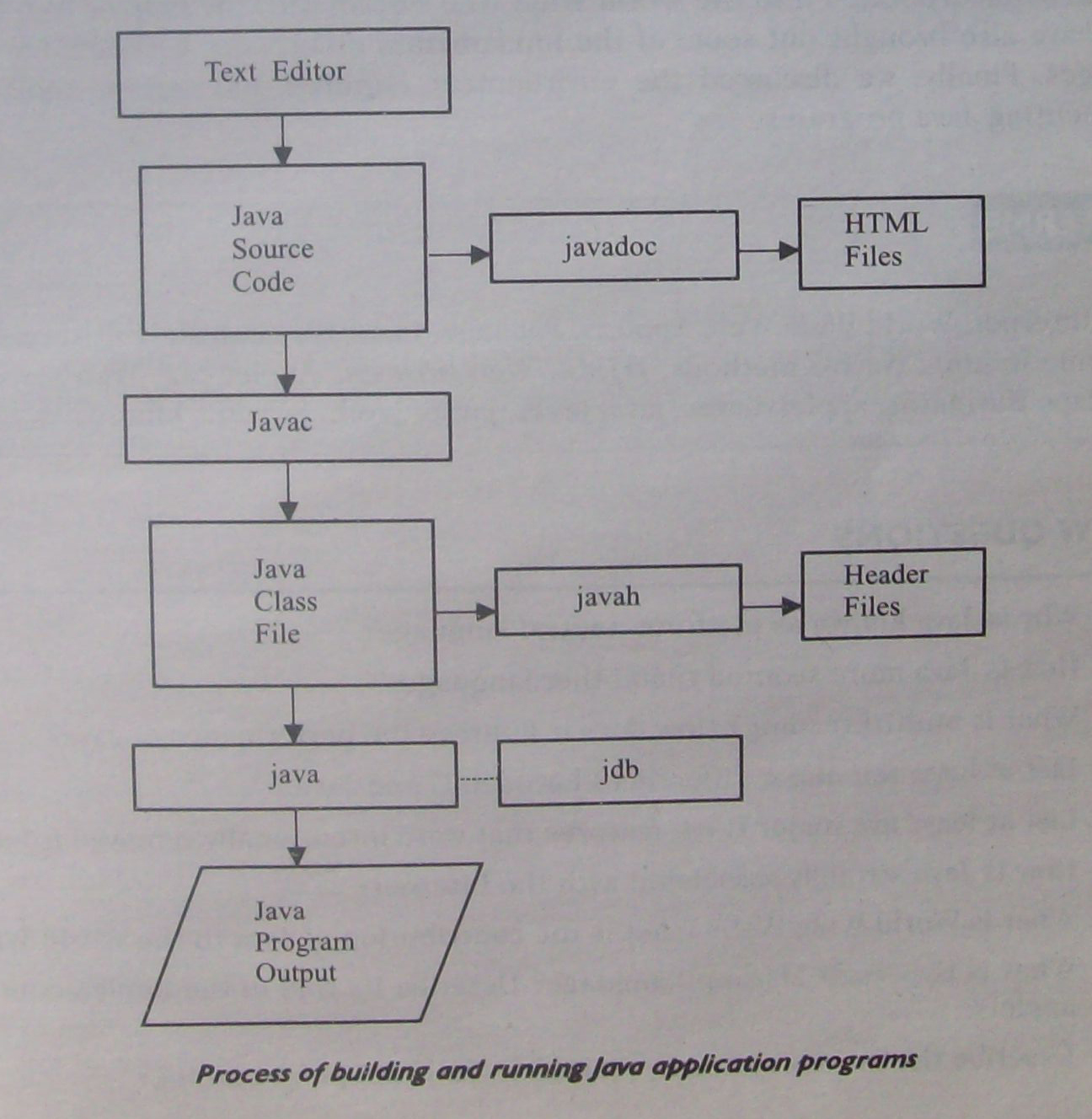
The way these tools are applied to build and run application programs is illustrated in Fig. . To create a Java program, we need to create a source code file using a text editor. The source code is then compiled using the Java compiler javac and executed using the Java interpreter java. The Java debugger jdb is used to find errors, if any, in the source code. A compiled Java program can be converted into a source code with the help of Java disassembler javap. We learn more about these tools as we work through the book.

Application Programming Interface

The Java Standard Library (or API) includes hundreds of classes and methods grouped into several functional packages (see Appendix G). Most commonly used packages are:

• Language Support Package: A collection of classes and methods required for implementing basic features of Java.
• Utilities Package: A collection of classes to provide utility functions such as date and time functions.


• Input / Output : A Collection of classes required for input/output manipulation .

• Networking Package : A collection of classes for communicating with order computers
via Internet .

• AWT Package : The abstract window Tool Kit package contains classes that implements
platform-independent graphical user interface .

• Applet Package : The includes a set of classes that allows us to create java applets .

The use of these libray classes will become evident when we start developing java programs .


Wednesday, 20 June 2012

Java Support Systems

Java Support:
It is clear from the discussion we had tip to now that the operation of Java and Java-enabled browsers on the Internet requires a variety of support systems. Table lists the systems necessary to support Java for delivering information on the Internet.

          Java Support Systems

Support System                      Deseriptilm
_________________________________________________________________

Internet Connection                           Local computer should be connected to the Internet.

Web Server                                     A program that accepts requests for information and sends the required                       
                                                         documents.


Wehlirowser                                   A program that provides access to WWW and runs Java applets.


lITNIL                                           
A language for creating hypertext for the Web.


APPLFT Tag                               For placing Java applets in FITML document.

Java Code                                   Java code is used for defining Java applets                                               

Bytecode                                   Compiled Java code that is referred loin the APPLET tag and transferred to             
                                                  the user computer..
_________________________________________________________________________________

Thursday, 14 June 2012

Hardware And Software Requirement

Java - Hardware And Software Requirement :
Java is currently supported on Windows 95, Windows NT, Sun Solaris, Macintosh, and UNIX machines. Though, the programs and examples in this book were tested under Windows 95, the most popular operating system today, they can be implemented on any of the above systems.
The minimum hardware and software requirements for Windows 95 version of Java are as follows:

• IBM-compatible 486 system
• A hard drive
• Minimum of 8 MB memory
• A CD-ROM drive
• Windows 95 software
• A Microsoft-compatible mouse
• A Windows-compatible sound card, if necessary

Tuesday, 5 June 2012

HotJava

Hot Java:

HotJava is the Web browser from Sun Microsystems that enables the display of interactive content on the Web, using the Java language. HotJava is written entirely in Java and demonstrates the capabilities of the Java programming language.
When the Java language was first developed and ported to the Internet, no browsers were available that could run Java applets. Although we can view a Web page that includes Java applets with a regular browser, we will not gain any of Java's benefits. HotJava is currently available for the SPARC/Solaris platform as well as Windows 95 and Windows NT. So far as being a Web browser goes, it is nothing special and does not offer anything special that most other Web browsers don't offer. Its biggest draw is that it was the first Web browser to provide support for the .Java language, thus making the Web more dynamic and interactive.

Netscape Navigator

Netscape N:ivigator, from Netscape Communications Corporation, is a general-purpose browser that can run Java applets. With versions available for Windows 95, NT, Solaris and Apple Macintosh, Netscape Navigator is one of the most widely used browsers today.
Netseape Navigator has many useful features such as visual display about downloading process and indication of the number bytes downloaded. It also supports JavaScript, a scripting language used in HTML documents.

Internet Explorer

Internet Explorer is another popular browser developed by Microsoft for Windows 95 and NT Workstations. Both the Navigator and Explorer use tool bars, icons, menus and dialog boxes for easy navigation. Explorer uses a just-in-time (JIT) compiler which greatly increases the speed of execution.

Saturday, 26 May 2012

Web Browsers

Web Browser: 
As pointed out earlier, the Internet is a vast sea of information represented in many formats and stored on many computers. A large portion of the Internet is organized as the World Wide Web which uses hypertext. Web browsers are used to navigate through the information found on the net. They allow us to retrieve the information spread across the Internet and display it using the hypertext markup language (I-ITML). Examples of Web browsers, among others, include:


• Hot Java
• Netscape Navigator
• Internet Explorer


Thursday, 17 May 2012

Java And World Wide Web

Java And Web:

World Wide Web (\\*WW) is an open-ended information retrieval system designed to be used in the Internet's distributed environment. This system contains what are known as Web pages that provide both information and controls. Unlike a menu-driven system where we are guided


through a particular direction using a decision tree structure, the Web system is open-ended and we can navigate to a new document in any direction as shown in Fig. . This is made possible with the help of a language called Hypertext Markup Language (HTML). Web pages contain HTML tags that enable us to find, retrieve, manipulate and display documents worIchvide.
Java was meant to be used in distributed environments such as Internet. Since, both the Web and Java share the same philosophy, Java could be easily incorporated into the Web system. Before Java, the World Wide Web was limited to the display of still images and texts. However, the incorporation ofJava into Web pages has made it capable of supporting animation. graphics, games, and a wide range of special effects. With the support of Java, the Web has become more interactive and dynamic. On the other hand, with the support of Web, we can run a Java program on someone else's computer across the Internet.


Java communicates with a Web page through a special tag called <APPLET>. Figure  illustrates this process. The figure shows the following communication steps:
1. The user sends a request for an HTML document to the remote computer's Web server. The Web server is a program that accepts a request, processes the request, and sends the required document.
2. The HTNIL document is returned to the user's browser. The document contains the APPLET tag, which identifies the applet.
3. The corresponding applet bytecode is transferred to the user's computer. This bytecode had been previously created by the Java compiler using the Java source code file for that applet.
4. The Java-enabled browser on the user's computer interprets the bytecodes and provides output.
5. The user may have further interaction with the applet but with no further downloading from the provider's Web server. This is because the bytecode contains all the information necessary to interpret the applet.


Friday, 11 May 2012

Java And Internet


Java And Internet:
Java is strongly associated with the Internet because of the fact that the first application program written in Java was HotJava. a Web browser to run applets on Internet. Internet users can use Jas -a to create applet programs and run them locally using a "Jas -a-enabled browser'. such as HotJava. They can also use a Java-enabled browser to download an applet located on a computer any, there in the Internet and run it on his local computer . In fact, Java applets have made the Internet a true extension of the storage system of the local computer.
Internet users can also set up their Web sites containing Java applets that could be used by other remote users of Internet. The ability of Java applets to hitch a ride on the Information Superhighway has made Java a unique programming language for the Internet. In fact, due to this, Java is popularly known as Internet language.

Sunday, 6 May 2012

Java Differ From C And C++


Although java was modeled after C and C++ languages, it differ from C and C++ in many ways, java does not incorporate a number of features available in C and C++. For the benefit of C and C+ + programmers, we point out here a few major differences between C/C+ + and Java languages.

Java and C

Java is a lot like C but the major difference between Java and C is that Java is an object-oriented language and has mechanism to define classes and objects. In an effort to builds simple and safe language. the Java team did not include some of the C features in Java.
Java does not include the C unique statement keywords goto, sizeof, and typedef.
Java does not contain the data types struct, union and enum.
Java does not define the type modifiers keywords auto, extern, register, signed, and unsigned.
Java does not support an explicit pointer type.
Java does not have a preprocessor and therefore we cannot use # define, # include, and # ifdef statements.
Java does not support any mechanism for defining variable arguments to functions.
Java requires that the functions with no arguments must be declared with empty parenthesis and not with the void keyword as done in C.
Java adds new operators such as instanceof and > > >.
Java adds labelled break and continue statements.
Java adds many features required for object-oriented programming.

Java and C+ +

Java is a true object-oriented language while C+ + is basically C with object-oriented extension. That is what exactly the increment operator ++ indicates. C++ has maintained backward compatibility with C. It is therefore possible to write an old style C program and run it successfully under C+ +. Java appears to be similar to C+ + when we consider only the "extension" part of C+ +. However, some object-oriented features of C++ make the C++ code extremely difficult to follow and maintain.
Listed below are some major C+ + features that were intentionally omitted from Java or significantly modified.
Java does not support operator overloading.
Java does not have template classes as in C+ +.
Java does not support multiple inheritance of classes. This is accomplished using a new feature called -interface".
Java does not support global variables. Every variable and method is declared within a class and forms part of that class.
Java does not use pointers.
Java has replaced the destructor function with a finalize( ) function.
There are no header files in Java.

Java also adds some new features. While C+ + is a superset of C. Java is neither a superset nor a subset of C or C++. Java may be considered as a first cousin of C++ and a second cousin of C as illustrated in Fig.. A more detailed discussion on the differences between C+ + and Java is available in Appendix C.